
TABLE OF CONTENTS
- Introduction
- How Customer Flight Paths work
- Flight Path Analysis skill
- Use filters to focus your analysis
- Turn Flight Paths into action
- Measure your repeat respondent population with Gaige
- Frequently asked questions
- How many responses does a contact need before receiving a Flight Path?
- How often is a Flight Path recalculated?
- Can I push the Flight Path to Salesforce or HubSpot as a field?
- What happens if a contact leaves or changes account?
- Are Flight Paths only available for relationship surveys?
- Can I receive an alert when an account becomes Descending?
- How can I see how many contacts are repeat respondents?
Introduction
A single Net Promoter Score (NPS) response tells you how a customer feels at a single point in time. Customer Flight Paths add the dimension of time by showing how a contact's loyalty changes across repeated responses.
Use Flight Paths to identify stable advocates, spot declining relationships, and learn from customers who recovered after a poor experience.
How Customer Flight Paths work
A contact needs a minimum of two survey responses before CustomerGauge can assign a Flight Path. The status is evaluated whenever an Account or Contact page is loaded and whenever a new response is received.
Flight Paths are calculated from survey records. Each survey record retains its references to both the contact and the account, preserving the account context in which the feedback was collected.
Keep in mind: Flight Paths highlight patterns in customer loyalty. Use survey comments, account activity, and other context to understand what may have caused a change.
Flight Path statuses
CustomerGauge uses six customer-friendly statuses to describe the shape of a repeat respondent's journey.
| Flight Path | Visual | What it shows |
| Level Flight | 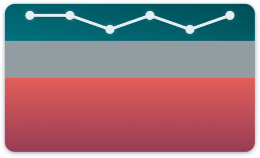 | The contact remains within the same loyalty band over time. |
| Climbing | 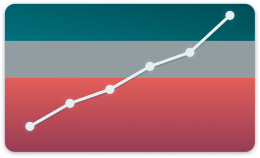 | The contact moves to a higher loyalty band and sustains the improvement. |
| Pull Up | 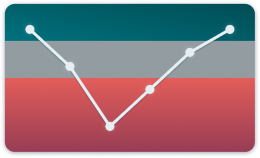 | The relationship declines and then recovers to a stronger position. |
| Descending | 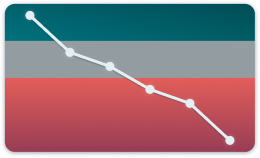 | The contact moves to a lower loyalty band and remains there. |
| Suborbital | 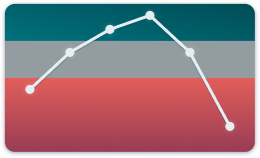 | The relationship improves, reaches a high point, and then falls back. |
| Off Radar | 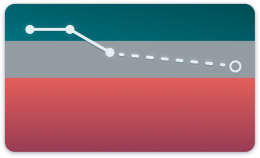 | The contact previously responded but has since stopped responding. |
Flight Path Analysis skill
Where can I find it?
Click on Gaige → Flight Path Analysis from the main menu. Alternatively, select the + button in Gaige Chat and choose Flight Path Analysis.
How do I run an analysis?
1. Choose a Flight Path Breakdown Scope:
- Accounts classifies companies or accounts using their response history.
- Contacts classifies individual contacts using their response history.
2. Optionally limit the analysis using:
- Saved filters, or
- Select manually to create filters.
3. Select Run analysis.
4. The report opens in a new Gaige Chat conversation.
The analysis uses response sent dates from 2010 through the current year. Your selected filters and existing data-access restrictions are applied.
What does the report include?
- Response Frequency Distribution: Shows how contacts are distributed by their number of responses, with counts, percentages, and a column chart.
- Flight Path Breakdown: Groups accounts or contacts into the six Flight Path types and provides clickable counts and percentages.
- Pull-Up Driver Analysis: Compares drivers selected when loyalty declined with those selected after recovery.
- Supporting Comments: Provides examples of low-score comments from the decline and high-score comments from the recovery, with links to the corresponding CG-IDs.
- Strategic Insights: Highlights engagement gaps, causes of declining loyalty, recovery drivers, and recommended actions.
Use filters to focus your analysis
Customer Flight Paths are not limited to relationship surveys. Use the available filters to focus on the survey programme, segment, or other selection that is relevant to your analysis, including transactional feedback.
Turn Flight Paths into action
Find advocates
Review strong Level Flight contacts to find potential references, case-study participants, advisory-board members, upsell opportunities, and referrals.
Protect relationships at risk
Use Descending Flight Paths to identify contacts and accounts that may need attention. Review their recent feedback and account context to prioritise follow-up and investigate common issues.
Learn from successful recoveries
Pull Up Flight Paths show where a relationship recovered after a decline. Review the comments and follow-up activity to understand what helped rebuild the relationship and turn effective recovery actions into repeatable practices.
Measure your repeat respondent population with Gaige
A repeat respondent is a contact with at least two responses. To see how response frequency is distributed across your contact population, open Gaige and enter the following prompt.
| Show me the all-time repeat respondent frequency distribution, grouped into individual buckets for 1 through 12 responses, and combine all contacts with more than 12 responses into a single 'More than 12 responses' bucket. Display the results as both a table and a column chart. |
Frequently asked questions
How many responses does a contact need before receiving a Flight Path?
A minimum of two responses.
How often is a Flight Path recalculated?
It is evaluated each time an Account or Contact page is loaded and whenever a new response is received.
Can I push the Flight Path to Salesforce or HubSpot as a field?
No. The Flight Path remains within CustomerGauge. You can, however, include it as a status in CustomerGauge email alerts.
What happens if a contact leaves or changes account?
Flight Paths are calculated from survey records rather than by joining the contact's current profile to an account. Each historical survey record continues to reference the contact and the account associated with that response. If the contact later leaves or changes account, the earlier response and its Flight Path context remain included on the original account page.
Are Flight Paths only available for relationship surveys?
No. Use filters to view the survey programme or segmentation that is relevant to you, including transactional feedback.
Can I receive an alert when an account becomes Descending?
Yes. Include the current Flight Path status and previous NPS information in a New Response email alert. When an incoming response places the contact on a Descending path, the alert provides that status and the previous-score context.
How can I see how many contacts are repeat respondents?
Use Gaige with the prompt in the section above to return an all-time response-frequency table and column chart. Contacts with two or more responses are the repeat respondent population eligible for a Flight Path.