
You will be carefully seeking out which contacts are relevant to survey for each customer organization. This is not a one-off exercise but a repeated one, as contacts come and go. We recommend doing this exercise on a quarterly basis.
Directions
Establish ideal number of contacts per account. Keep in mind that quality data (relevant contacts) speaks louder than the total number of contacts – if you have too few contacts for an account, make sure that you add extra ones only if they are relevant.
What makes a contact relevant?
- If they are a frequent user of your product or services on a front-line level - C contacts.
- If they are your main contact at the account / the main contact or representative in their business for your product or services - B contacts.
- If they are invested in the need and success their company has with your products and/or services, and are the decision maker around your contract with them - A contacts.
Not only the total amount of relevant contacts per account is relevant – also ensure having a good distribution of A (strategic), B (tactical), and C (operational) contacts for each account. If you have a dropdown list in your CRM system that carries role information, and A/B/C is not available on the contact, you may want to work with your CRM tech resource to create a formula field that converts the ‘role’ info into A, B, or C.
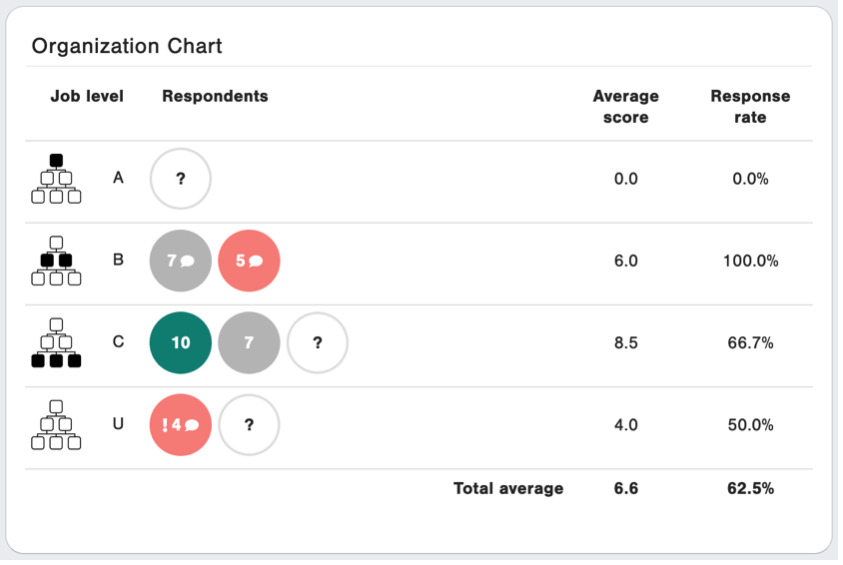
Update this every quarter to make sure that you do not include anyone who has left the organization – permanently or temporarily – or is no longer involved with your company.
Extra tips on how to make this exercise easier for your Account Managers:
- Include a “Relational survey” option on the contact level so that it is easy for AMs/CSMs to nominate contacts for the relational survey or remove people that are no longer relevant
- Include a “Left company” field in your CRM that should be ticked when customers leave their company. Ensure you are filtering out customers that have now left the company
- Set up notifications from your CRM to the AM/CSM notifying them prior to upload that the survey is about to be sent to this customer and to this contact and that they should update the contacts if needed