
TABLE OF CONTENTS
- Introduction
- Enabling AI Voice Interview Survey Agent
- Greeting Examples (Introduction Instructions)
- Additional Considerations
- Go Live Checklist
- Privacy
- Supported Locales
Introduction
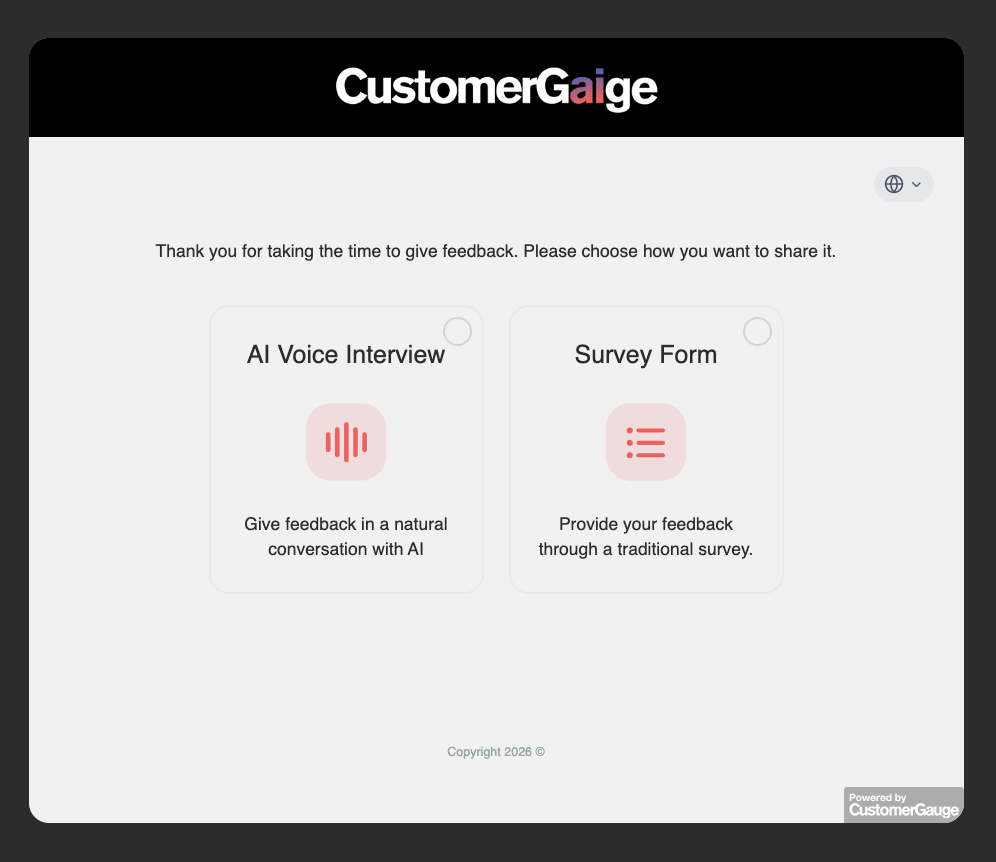
Customers with Gaige AI Credit packages can choose to leverage the AI Voice Interview Survey Agent for any of their Campaign Surveys. With the Gaige AI Voice Interview Survey Agent, respondents can have a live interview by voice with Gaige, being able to share their feedback as if they were talking to a human representative. The respondents would still have the option of completing the survey via a traditional feedback form if preferred instead, even when this feature is activated. AI Voice Interview invitations get delivered through the usual delivery vectors for Campaign Surveys: Email, SMS, WhatsApp, Personal Links.
Enabling AI Voice Interview Survey Agent
If you have already purchased Gaige Credits, first contact your Strategic Account Manager to have this feature enabled on your system.
Once enabled on your system, for the survey(s) that you would like to activate this Agent for:
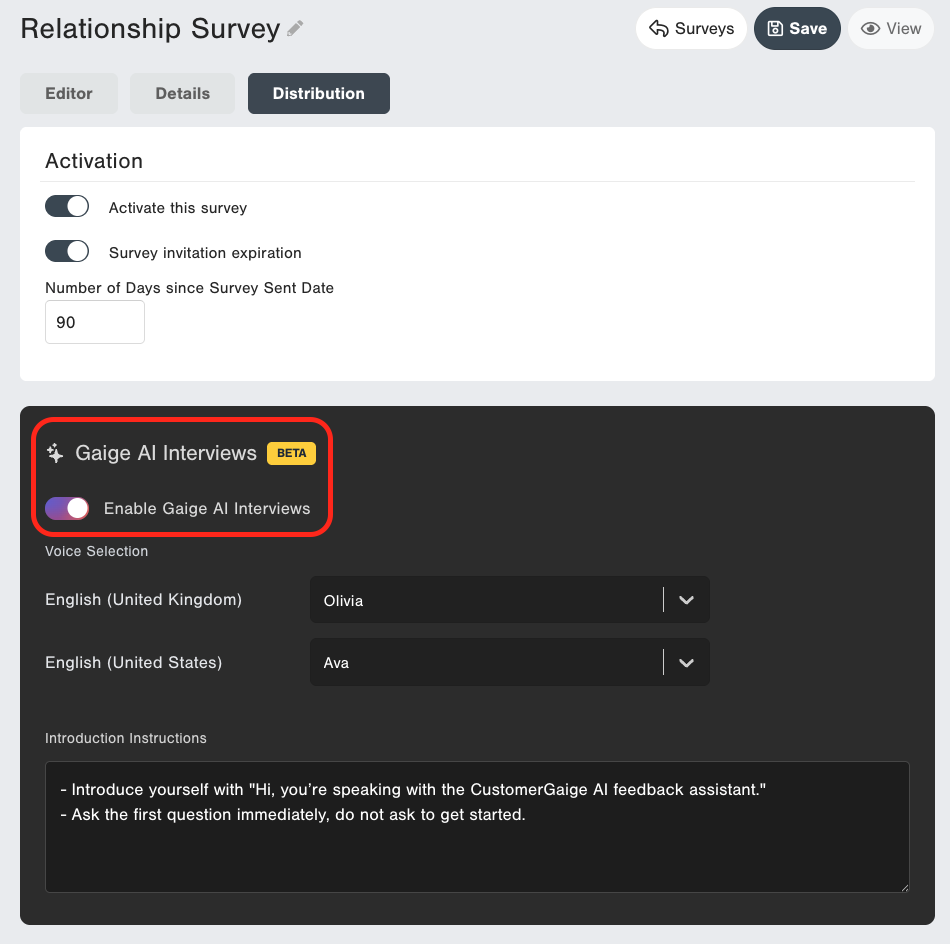
- Go to the survey and then Edit.
- Navigate to the Distribution tab.
- Scroll down until you see the "Gaige AI Interviews" section
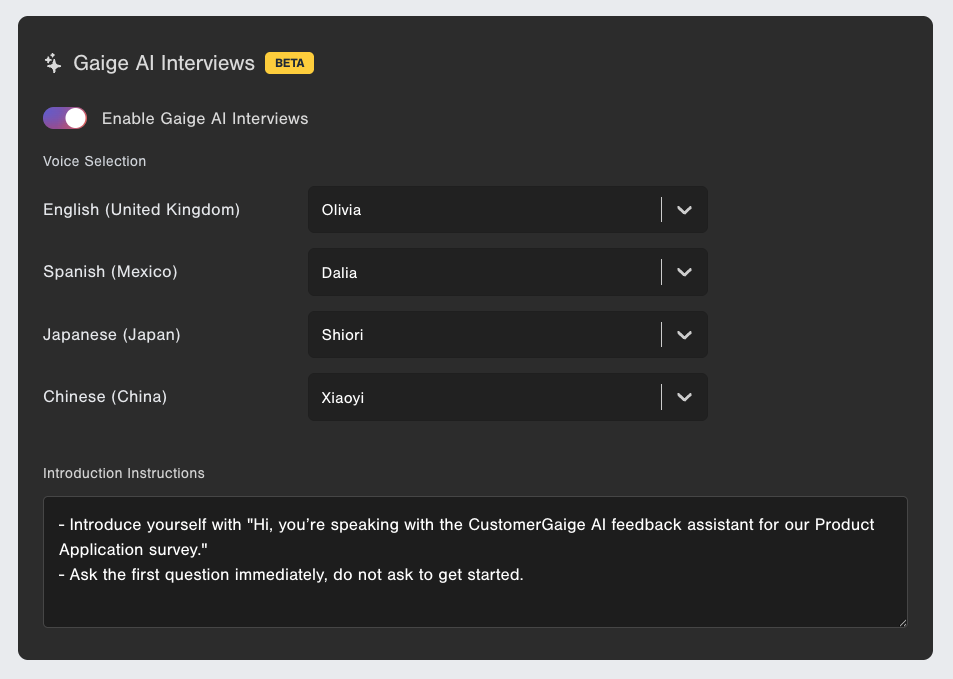
- Activate the toggle to enable Gaige AI Interviews
- Select Voice profiles for each of the languages your survey is configured in
- (Optional) Add additional "Introduction Instructions" to guide the opening frame of the survey when the AI interviewer begins speaking to your survey respondent.
For more information in general on creating and editing surveys, see here.
Greeting Examples (Introduction Instructions)
- Introduce yourself with "Hi, you're speaking with an AI feedback assistant for our relationship survey." |
- Ask the first question immediately, do not ask to get started. |
- Introduce yourself with "Hi, you're speaking with (Company Name)'s AI feedback assistant. Thanks for taking the time to speak with me today. Let's get started..." |
- Ask the first question immediately, do not ask to get started. |
Additional Considerations
- The AI Voice Interview Survey Agent is only available for Campaign Surveys at this time.
- Respondents must grant microphone access permission through their browser in order to take an AI Voice Interview Survey. A pop-up will appear prompting them to do so, if they select the AI Interview option.
- The maximum duration of an AI Interview is 10 minutes.
- An AI Voice interview will terminate if there is a period of silence where no responses are detected from the survey recipient after 2 minutes of silence.
- Be sure to phrase and order your survey questions in a way that will still be natural when conducted via an AI Voice interview when constructing your survey. Make the necessary wording edits when needed to any of your questions to ensure they work for both a traditional form survey as well as an AI Voice Interview survey.
- Due to data privacy, AI Voice Interview Surveys do not support / do not respect Display Conditions based on Data.
- AI Voice Interview Surveys do not support the Reviews Widget / CustomerGauge Reviews Feature.
- AI Voice Interview Surveys do not support the embedded scale option in email campaigns. We recommend using the "button" option with a traditional "take the survey" button for any campaign in which you have enabled the AI Interview survey option.
Go Live Checklist
Here is a summarized list of some recommended actions to take to ensure a smooth go live. Further instructions are available throughout the article above:
- Ensure the feature is activated on your system. Submit a request to your Account Manager or Support if necessary.
- Configure the Introduction instructions for the AI
- Validate that the phrasing of the questions for all questions in the survey sounds natural both when read out loud by the AI as well as when read by a respondent on a traditional survey form.
- Validate that your question order will be natural for the AI option. Tips:
- Keep open comments at the end
- If using the "follow up" survey widget, it is recommended to place that at the very end of the survey, after all other questions
- If sending the survey via an Email Campaign survey, ensure the email template is using the traditional survey button and not an embedded question scale. The embedded question scales are only supported by the traditional survey form.
- Validate that the survey is configured in all desired languages/locales, and that a voice option is selected for each locale on the AI Voice Interviews configuration screen.
- Test before going live. Send yourself a test survey and complete it using the AI Voice Interview Agent, to ensure you are aligned with the experience your customers will be getting when choosing the option. Make any additional tweaks to the survey structure or AI settings if necessary.
Privacy
Privacy and legal information regarding the AI Voice Interview Survey Agent is available upon request. Please reach out to our Support team or your Strategic Account Manager to learn more.
Supported Locales
Gaige Voice Interviews are available in the following locales:
- Afrikaans (South Africa)
- Amharic (Ethiopia)
- Arabic (United Arab Emirates)
- Arabic (Bahrain)
- Arabic (Algeria)
- Arabic (Egypt)
- Arabic (Iraq)
- Arabic (Jordan)
- Arabic (Kuwait)
- Arabic (Lebanon)
- Arabic (Libya)
- Arabic (Morocco)
- Arabic (Oman)
- Arabic (Qatar)
- Arabic (Saudi Arabia)
- Arabic (Syria)
- Arabic (Tunisia)
- Arabic (Yemen)
- Azerbaijani (Azerbaijan)
- Bulgarian (Bulgaria)
- Bengali (India)
- Bosnian (Bosnia and Herzegovina)
- Catalan (Spain)
- Czech (Czechia)
- Welsh (United Kingdom)
- Danish (Denmark)
- German (Austria)
- German (Switzerland)
- German (Germany)
- Greek (Greece)
- English (Australia)
- English (Canada)
- English (United Kingdom)
- English (Ireland)
- English (India)
- English (Nigeria)
- English (New Zealand)
- English (Philippines)
- English (Singapore)
- English (United States)
- English (South Africa)
- Spanish (Argentina)
- Spanish (Bolivia)
- Spanish (Chile)
- Spanish (Colombia)
- Spanish (Costa Rica)
- Spanish (Dominican Republic)
- Spanish (Ecuador)
- Spanish (Spain)
- Spanish (Guatemala)
- Spanish (Honduras)
- Spanish (Mexico)
- Spanish (Nicaragua)
- Spanish (Panama)
- Spanish (Peru)
- Spanish (Puerto Rico)
- Spanish (Paraguay)
- Spanish (El Salvador)
- Spanish (United States)
- Spanish (Uruguay)
- Spanish (Venezuela)
- Estonian (Estonia)
- Basque (Spain)
- Persian (Iran)
- Finnish (Finland)
- French (Belgium)
- French (Canada)
- French (Switzerland)
- French (France)
- Irish (Ireland)
- Gujarati (India)
- Hebrew (Israel)
- Hindi (India)
- Croatian (Croatia)
- Hungarian (Hungary)
- Armenian (Armenia)
- Indonesian (Indonesia)
- Icelandic (Iceland)
- Italian (Italy)
- Japanese (Japan)
- Georgian (Georgia)
- Kazakh (Kazakhstan)
- Khmer (Cambodia)
- Kannada (India)
- Korean (South Korea)
- Lao (Laos)
- Lithuanian (Lithuania)
- Latvian (Latvia)
- Macedonian (North Macedonia)
- Malayalam (India)
- Marathi (India)
- Malay (Malaysia)
- Maltese (Malta)
- Burmese (Myanmar)
- Norwegian Bokmål (Norway)
- Nepali (Nepal)
- Dutch (Belgium)
- Dutch (Netherlands)
- Punjabi (India)
- Polish (Poland)
- Portuguese (Brazil)
- Portuguese (Portugal)
- Romanian (Romania)
- Russian (Russia)
- Sinhala (Sri Lanka)
- Slovak (Slovakia)
- Slovenian (Slovenia)
- Somali (Somalia)
- Albanian (Albania)
- Serbian (Serbia)
- Swedish (Sweden)
- Swahili (Kenya)
- Swahili (Tanzania)
- Tamil (India)
- Telugu (India)
- Thai (Thailand)
- Turkish (Turkey)
- Ukrainian (Ukraine)
- Urdu (India)
- Urdu (Pakistan)
- Uzbek (Uzbekistan)
- Vietnamese (Vietnam)
- Chinese (China)
- Chinese (Hong Kong)
- Chinese (Taiwan)
- Zulu (South Africa)