
TABLE OF CONTENTS
- Introductions:
- Snowflake Integrations Use cases
- How it works
- What you need to do on the CustomerGauge side
- Where each item goes
- Set it up
- Field map
- Good to know
Introductions:
You can integrate Snowflake with CustomerGauge to send surveys, retrieve survey responses, and track Close the Loop cases directly from your Snowflake environment.
This two-way integration leverages a stored procedure to send new contact records from Snowflake to CustomerGauge for surveying, and retrieve survey responses and Close the Loop case updates back into Snowflake.
All information is written back to the corresponding contact record in Snowflake, allowing you to keep your customer data in one place.
The integration runs directly from Snowflake, without the need for file transfers, middleware, or additional servers.
Snowflake Integrations Use cases
You can use the Snowflake integration to send contact data to CustomerGauge, retrieve survey responses and Close the Loop case information, or use both directions together.
- Send Contacts (Push): Send new contact records from Snowflake to CustomerGauge to trigger survey invitations.
- Retrieve Survey Responses (Pull): Retrieve completed survey responses from CustomerGauge and update the corresponding contact records in Snowflake.
- Retrieve Close the Loop Cases (Pull): Retrieve Close the Loop case information and status updates from CustomerGauge and write these back to the corresponding contact records in Snowflake.
How it works
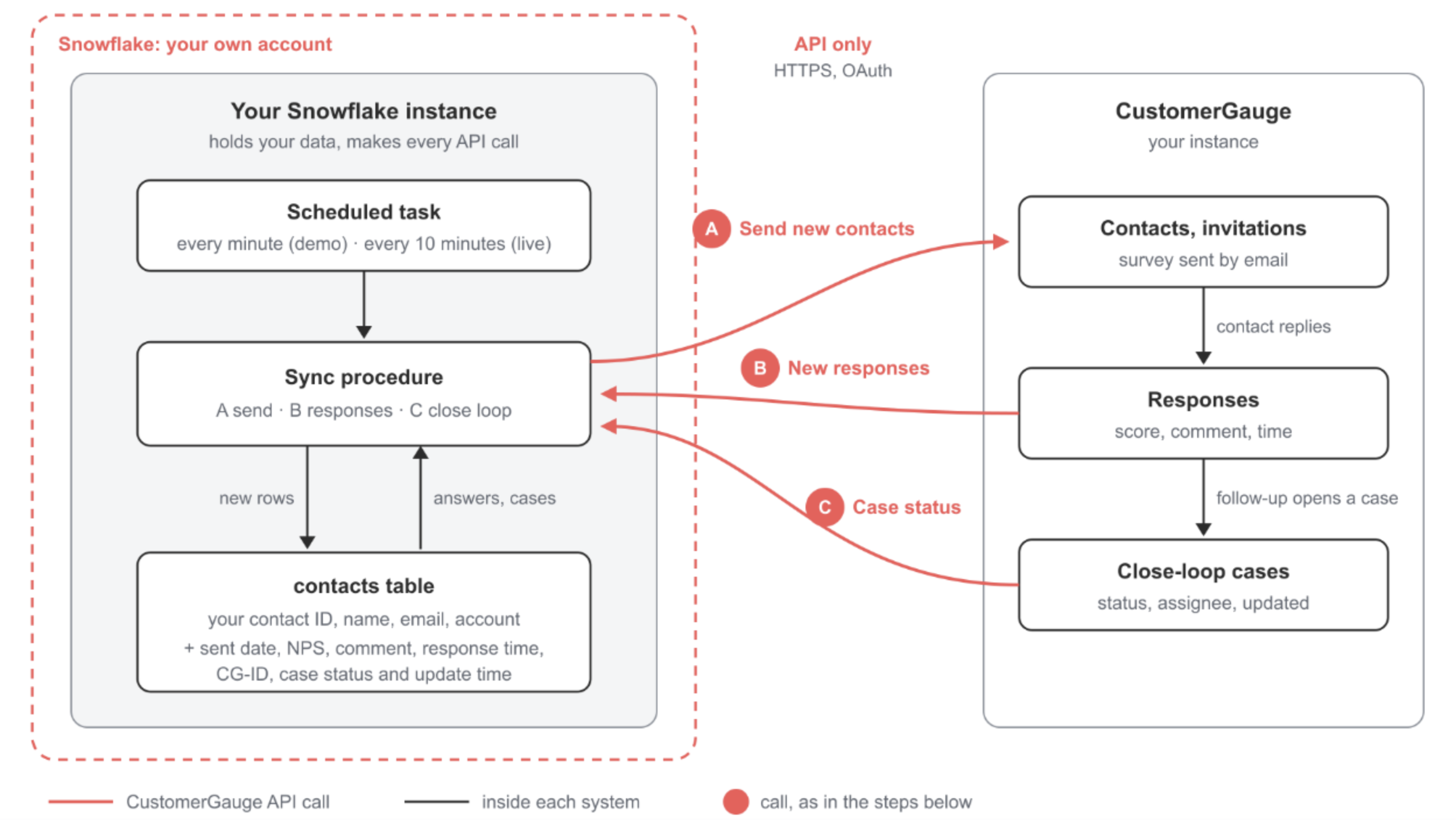
Everything runs inside your Snowflake account. CustomerGauge is reached only through its API.
A · Send: New contacts go out
Any row with no send_status is sent to CustomerGauge, which creates the contact and emails the survey.
B · Responses: Answers come back
New responses are matched on your contact ID and written onto the row: NPS, comment, time and CustomerGauge ID.
C · Close loop: Case status follows
Each case carries its response ID, which leads back to your contact. Status, assignee and update time are kept current.
GET https://api.eu.customergauge.com/v7/rest/sync/close-loop
What you need to do on the CustomerGauge side
Before configuring the Snowflake integration, you will need to retrieve three items from your CustomerGauge system.
If you have Admin permissions in CustomerGauge, you can retrieve all three items yourself.
API key
In CustomerGauge, go to Data → REST API → Authentications and create an authentication. It comes as a client ID and a client secret, which Snowflake exchanges for a short-lived token on every run (OAuth client credentials). Note your instance's region too:
eu,usorau. Keep the secret somewhere safe.Import ID/Reference
Go to Data → REST API → Inbound Mapping and create a mapping of type Multi-Object with the list of Data fields. The type Multi-Object creates or updates the account and contact, then sends the survey. Save it and copy its Reference. That is the Reference ID the code sends with every record so CustomerGauge knows the field mapping to use.
Where each item goes
| Item | Where to find it | Placeholder in the code |
|---|---|---|
| API key (client ID and secret) | CustomerGauge: Data → REST API → Authentications | <YOUR_CLIENT_ID>, <YOUR_CLIENT_SECRET> |
| Region | The region of your CustomerGauge instance: eu, us or au | REGION and the network rule hosts |
| Import ID (inbound mapping Reference) | CustomerGauge: Data → REST API → Inbound Mapping (Multi-Object, REST) | <YOUR_MAPPING_REFERENCE> |
| Snowflake role and warehouse | ACCOUNTADMIN (or a role allowed to create integrations), and any warehouse | <YOUR_WAREHOUSE> |
The mapping must include these headings: Email, First Name, Last Name, Account Name, Account Reference, Contact ID, Job Title, Locale, Touchpoint and Delivery Vector.
Set it up
1) Create Credentials in Snowflake Workspace
Once you have the CustomerGauge API credentials setup, store the credentials in Snowflake by running the code below.
If successful you will a receive code 200. You can remove the file. This is will allow you to recall the credentials but not have the credentials stored in plain text.
CREATE OR REPLACE SECRET cg_api.raw.cg_api_client
TYPE = PASSWORD
USERNAME = '<Client ID>'
PASSWORD = '<Client Secret>';
2) Let Snowflake reach CustomerGauge [User Role & Region]
Below covers the required User Role and Database setup in Snowflake. Please replace the correct CustomerGauge hosting based on where your CustomerGauge system is hosted [us, eu or au].
USE ROLE ACCOUNTADMIN;
CREATE DATABASE IF NOT EXISTS customergauge;
CREATE SCHEMA IF NOT EXISTS customergauge.sync;
USE SCHEMA customergauge.sync;

-- The three CustomerGauge hosts. Use your region: eu, us or au.
CREATE OR REPLACE NETWORK RULE cg_api_rule
  MODE = EGRESS TYPE = HOST_PORT
  VALUE_LIST = ('auth.eu.customergauge.com',
                'api.eu.customergauge.com',
                'imports.api.eu.customergauge.com');

CREATE OR REPLACE EXTERNAL ACCESS INTEGRATION cg_api_access
  ALLOWED_NETWORK_RULES = (customergauge.sync.cg_api_rule)
  ALLOWED_AUTHENTICATION_SECRETS = (customergauge.sync.cg_api_client)
  ENABLED = TRUE;
3) Create the contact table and add one contact
Start with a single record. Include your Snowflake contact_id (sent to CustomerGauge as the Contact ID). It's how responses and cases find their way back to correct record in Snowflake.
CREATE OR REPLACE TABLE customergauge.sync.contacts (
  contact_id            STRING,          -- your ID; sent to CustomerGauge and used to match everything back
  email                 STRING,
  first_name            STRING,
  last_name             STRING,
  account_name          STRING,
  account_ref           STRING,          -- your account ID
  job_title             STRING,
  added_at              TIMESTAMP_NTZ DEFAULT CURRENT_TIMESTAMP(),
  send_status           STRING,          -- sent | error <http code>   (empty = not sent yet)
  sent_at               TIMESTAMP_NTZ,
  send_reply            STRING,
  cg_id                 STRING,          -- the CustomerGauge response ID
  nps                   INT,
  nps_category          STRING,
  comment               STRING,
  responded_at          TIMESTAMP_NTZ,
  close_loop_status     STRING,          -- open | progress | closed
  close_loop_assignee   STRING,
  close_loop_updated_at TIMESTAMP_NTZ
);

-- One contact to start with. Any row added later, by you or by any process, is sent on the next run.
INSERT INTO customergauge.sync.contacts
  (contact_id, email, first_name, last_name, account_name, account_ref, job_title)
VALUES
  ('C-0001', 'jane.doe@example.com', 'Jane', 'Doe', 'Example Ltd', 'ACC-0001', 'Operations Director');

-- What each run did, and the API cursor kept between runs.
CREATE TABLE IF NOT EXISTS customergauge.sync.sync_log (
  ran_at TIMESTAMP_NTZ DEFAULT CURRENT_TIMESTAMP(),
  sent_ok INT, send_errors INT, new_answers INT, case_updates INT, notes STRING);
CREATE TABLE IF NOT EXISTS customergauge.sync.sync_state (key STRING, value STRING);
4) Create the sync procedure (A, B and C)
Fill in the placeholders at the top. It gets one token per run and renews it if it expires, and a failure in one step is logged without stopping the others.
CREATE OR REPLACE PROCEDURE customergauge.sync.sync_with_customergauge()
RETURNS STRING LANGUAGE PYTHON RUNTIME_VERSION = '3.11'
PACKAGES = ('snowflake-snowpark-python', 'requests') HANDLER = 'run'
EXTERNAL_ACCESS_INTEGRATIONS = (cg_api_access)
SECRETS = ('cred' = customergauge.sync.cg_api_client)
EXECUTE AS CALLER
AS $$
import _snowflake, requests, datetime

REGION     = 'eu'                              # eu | us | au
AUTH       = f'https://auth.{REGION}.customergauge.com/oauth2/token'
SEND       = f'https://imports.api.{REGION}.customergauge.com/records/'
SYNC       = f'https://api.{REGION}.customergauge.com/v7/rest/sync/'
MAPPING    = '<YOUR_MAPPING_REFERENCE>'        # Multi-Object inbound mapping (REST)
TOUCHPOINT = '<YOUR_TOUCHPOINT>'               # e.g. Relationship
LOCALE     = 'en_GB'
T          = 'customergauge.sync.'


class CG:
    """Gets a token once per run and renews it if it expires mid-run."""
    def __init__(self):
        self.tok = None

    def call(self, method, url, **kw):
        for attempt in (1, 2):
            if not self.tok:
                c = _snowflake.get_username_password('cred')
                r = requests.post(AUTH, data={'grant_type': 'client_credentials',
                                              'client_id': c.username, 'client_secret': c.password}, timeout=30)
                r.raise_for_status()
                self.tok = r.json()['access_token']
            r = requests.request(method, url, headers={'Authorization': 'Bearer ' + self.tok}, timeout=60, **kw)
            if r.status_code == 401 and attempt == 1:
                self.tok = None
                continue
            return r


def rows_updated(res):
    return int(res[0].as_dict().get('number of rows updated', 0)) if res else 0


def run(session):
    cg, notes = CG(), []
    sent_ok = send_errors = answers = cases = 0

    # 1. Send every contact that hasn't been sent yet
    for c in session.sql(f"""SELECT contact_id, email, first_name, last_name, account_name, account_ref, job_title
                             FROM {T}contacts WHERE send_status IS NULL""").collect():
        record = {'Email': c['EMAIL'], 'First Name': c['FIRST_NAME'], 'Last Name': c['LAST_NAME'],
                  'Account Name': c['ACCOUNT_NAME'], 'Account Reference': c['ACCOUNT_REF'],
                  'Contact ID': c['CONTACT_ID'], 'Job Title': c['JOB_TITLE'], 'Locale': LOCALE,
                  'Touchpoint': TOUCHPOINT, 'Delivery Vector': 'Email'}
        try:
            r = cg.call('PUT', SEND, json={'configuration': MAPPING, 'record': record})
            ok = 200 <= r.status_code < 300
            sent_ok += ok; send_errors += not ok
            session.sql(f"""UPDATE {T}contacts SET send_status = ?, sent_at = IFF(?, CURRENT_TIMESTAMP(), NULL),
                            send_reply = ? WHERE contact_id = ?""",
                        params=['sent' if ok else f'error {r.status_code}', ok, r.text[:500], c['CONTACT_ID']]).collect()
        except Exception as e:
            notes.append(f'send {c["CONTACT_ID"]}: {e}')

    # 2. Listen for new responses; match on your contact ID (returned as number_customer)
    try:
        ours = {r[0] for r in session.sql(f"SELECT contact_id FROM {T}contacts WHERE sent_at IS NOT NULL").collect()}
        got = session.sql(f"SELECT value FROM {T}sync_state WHERE key = 'responses_cursor'").collect()
        cur = got[0][0] if got else None
        for _ in range(20):
            r = cg.call('GET', f'{SYNC}responses?per_page=1000' + (f'&cursor={cur}' if cur else ''))
            r.raise_for_status()
            body = r.json(); data = body.get('data') or []
            for d in data:
                cid = str(d.get('number_customer') or '').strip()
                if cid not in ours:
                    continue
                comment = d.get('comment')
                if isinstance(comment, dict):
                    comment = comment.get('original')
                nps, cgid = d.get('nps'), str(d.get('number_customergauge'))
                answers += rows_updated(session.sql(f"""
                    UPDATE {T}contacts SET cg_id = ?, nps = ?, comment = ?,
                           responded_at = TRY_TO_TIMESTAMP_NTZ(?),
                           nps_category = CASE WHEN ? >= 9 THEN 'Promoter' WHEN ? >= 7 THEN 'Passive'
                                               WHEN ? IS NOT NULL THEN 'Detractor' END
                    WHERE contact_id = ? AND (cg_id IS NULL OR cg_id <> ?)""",
                    params=[cgid, nps, comment, d.get('date_survey_response'), nps, nps, nps, cid, cgid]).collect())
            nxt = (body.get('cursor') or {}).get('next')
            if not data or not nxt:
                break
            cur = str(nxt)
        if cur:
            session.sql(f"""MERGE INTO {T}sync_state s USING (SELECT 'responses_cursor' k, ? v) x ON s.key = x.k
                            WHEN MATCHED THEN UPDATE SET value = x.v
                            WHEN NOT MATCHED THEN INSERT (key, value) VALUES (x.k, x.v)""", params=[cur]).collect()
    except Exception as e:
        notes.append(f'responses: {e}')

    # 3. Listen for close-loop changes; a case carries its response ID, which leads back to your contact ID
    try:
        ids = {r[0]: r[1] for r in session.sql(
            f"SELECT cg_id, contact_id FROM {T}contacts WHERE cg_id IS NOT NULL").collect()}
        if ids:
            today = datetime.date.today()
            start, end = today - datetime.timedelta(days=1), today + datetime.timedelta(days=1)
            cur = None
            for _ in range(10):
                r = cg.call('GET', f'{SYNC}close-loop?per_page=1000&updated_at[start]={start}'
                                   f'&updated_at[end]={end}' + (f'&cursor={cur}' if cur else ''))
                r.raise_for_status()
                body = r.json(); data = body.get('data') or []
                for d in data:
                    cgid = str(d.get('number_customergauge'))
                    if cgid not in ids:
                        continue
                    cases += rows_updated(session.sql(f"""
                        UPDATE {T}contacts SET close_loop_status = ?, close_loop_assignee = ?,
                               close_loop_updated_at = TRY_TO_TIMESTAMP_NTZ(?)
                        WHERE contact_id = ? AND (close_loop_status IS DISTINCT FROM ?
                              OR close_loop_updated_at IS DISTINCT FROM TRY_TO_TIMESTAMP_NTZ(?))""",
                        params=[d.get('status'), (d.get('assignee') or {}).get('email'), d.get('updated_at'),
                                ids[cgid], d.get('status'), d.get('updated_at')]).collect())
                nxt = (body.get('cursor') or {}).get('next')
                if not data or not nxt:
                    break
                cur = str(nxt)
    except Exception as e:
        notes.append(f'close-loop: {e}')

    session.sql(f"""INSERT INTO {T}sync_log (sent_ok, send_errors, new_answers, case_updates, notes)
                    VALUES (?, ?, ?, ?, ?)""",
                params=[sent_ok, send_errors, answers, cases, '; '.join(notes)[:2000] or None]).collect()
    return (f'{sent_ok} sent, {send_errors} send error(s), {answers} new answer(s), {cases} case update(s)'
            + (f' | {"; ".join(notes)}' if notes else ''))
$$;
5) Run it once, then schedule it
During implementation, set the schedule to run to every minute so you can see a response arrive. For production, we would recommend once every 10 minutes or hour. CustomerGauge returns everything that changed since the last run.
-- Run it once by hand: sends the first contact straight away
CALL customergauge.sync.sync_with_customergauge();

-- Then keep listening. Every minute for a demo; every 10 minutes is plenty in production.
CREATE OR REPLACE TASK customergauge.sync.sync_task
  WAREHOUSE = <YOUR_WAREHOUSE>
  SCHEDULE = '1 MINUTE'          -- production: '10 MINUTE'
AS
  CALL customergauge.sync.sync_with_customergauge();

ALTER TASK customergauge.sync.sync_task RESUME;
6) Watch it work
Respond to the survey email, then re-run the first query. The row moves from sent to an NPS score and comment. Assign or update the case in CustomerGauge and the close-loop columns follow on the next run.
-- Your contacts, with answers and case status as they arrive
SELECT contact_id, email, send_status, sent_at, nps, nps_category, comment, responded_at,
       cg_id, close_loop_status, close_loop_assignee, close_loop_updated_at
FROM customergauge.sync.contacts ORDER BY contact_id;

-- What each run did
SELECT * FROM customergauge.sync.sync_log ORDER BY ran_at DESC LIMIT 20;

-- Add another contact at any time; the next run sends it
INSERT INTO customergauge.sync.contacts
  (contact_id, email, first_name, last_name, account_name, account_ref, job_title)
VALUES ('C-0002', 'sam.lee@example.com', 'Sam', 'Lee', 'Example Ltd', 'ACC-0001', 'Finance Manager');

-- Pause or change the pace
ALTER TASK customergauge.sync.sync_task SUSPEND;
-- ALTER TASK customergauge.sync.sync_task SET SCHEDULE = '10 MINUTE';
Field map
| Snowflake column | Direction | CustomerGauge field |
|---|---|---|
contact_id | A out · B back | Contact ID → returned as number_customer |
email, first_name, last_name, job_title | A out | Email, First Name, Last Name, Job Title |
account_name, account_ref | A out | Account Name, Account Reference |
sent_at, send_status | A result | HTTP status of the send |
cg_id | B back | number_customergauge (response ID) |
nps, comment, responded_at | B back | nps, comment.original, date_survey_response |
close_loop_status, close_loop_assignee, close_loop_updated_at | C back | status, assignee.email, updated_at |
Good to know
- Delivery Vector is required. Use the correct Delivery Vector of choice [email, sms, whatsapp etc]. For example, not including
'Delivery Vector': 'email'the send returns 422. - Duplicate rule. CustomerGauge may hold back a second survey to the same address within its duplication window. The send then reports a duplicate instead of an error.
- Cases appear when someone acts. A case shows in the close-loop feed once its status changes, it is assigned or a comment is added.
- First run reads history. With no cursor yet, the first runs page through existing responses (up to 20,000 per run) before reaching new ones.
- Name tables in full. Procedures run in the caller's schema, so the code uses
customergauge.sync.…everywhere. - Keep the secret in Snowflake. The client ID and secret live only in
cg_api_client. Nothing else needs them. - Writing back. To update a case from Snowflake, the same pattern works with https://api.eu.customergauge.com/v7/rest/close-loop/status (
number_customergauge,status, optionalnoteandassignee).